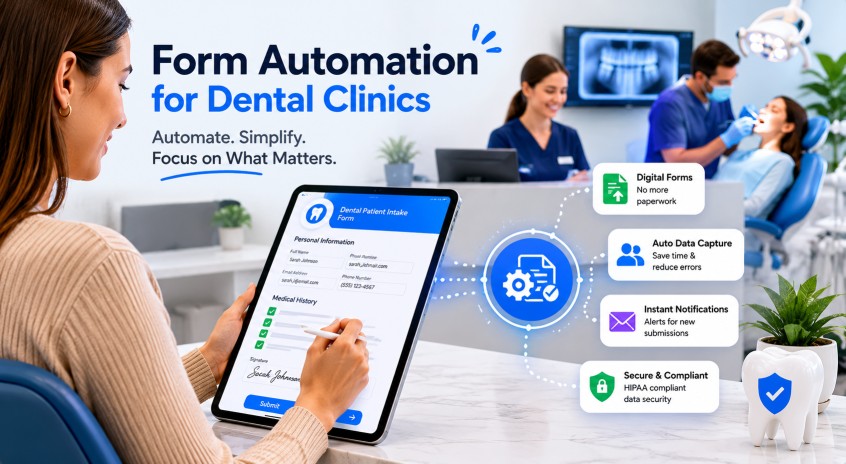
Why Your Dental Clinic Is Drowning in Paperwork
The average dental clinic spends over 14 hours per week on administrative tasks — and a huge chunk of that is managing patient forms. Paper intake forms get lost. Patients arrive early to fill out clipboards and still end up waiting. Staff re-enter the same data into your practice management software by hand, introducing errors every step of the way.
The good news? Form automation for dental clinics has matured rapidly. Today's solutions let you collect, validate, and sync patient data digitally — before the patient even walks through your door. In this guide, we'll break down exactly what form automation looks like in a dental practice, which forms to digitise first, and how to connect it all with the rest of your front-desk workflow.
What Is Form Automation for Dental Clinics?
Form automation replaces paper-based or manually-typed forms with digital workflows that collect patient information, route it to the right place, and trigger actions — all without staff intervention.
In a dental context, this typically covers:
- New patient intake forms — medical history, allergies, insurance details
- Consent forms — treatment consent, photography consent, HIPAA acknowledgements
- Insurance pre-authorisation forms — sent directly to insurers
- Post-visit satisfaction surveys — triggered automatically after an appointment
- Recall and reactivation forms — sent to lapsed patients to bring them back
The best systems don't just digitise these forms — they automate the entire lifecycle: send, remind, receive, validate, and sync into your patient record.
The Real Cost of Manual Forms (Numbers That Add Up Fast)
Before committing to any technology, it helps to understand what the status quo is costing you:
- A front-desk staff member manually entering a new patient form takes 8–12 minutes
- Paper forms have an average error rate of 3–5% — meaning re-work and callbacks
- Patients who receive a digital intake link before their appointment show up 6 minutes earlier on average and have lower no-show rates
- Practices using automated digital forms report saving $400–$800 per month in staff admin time alone
Multiply those savings across a year and it quickly dwarfs the cost of any automation tool.
4 Forms Every Dental Clinic Should Automate First
1. New Patient Intake Form
This is the highest-impact form to automate. Send a digital link via SMS or email when a new appointment is booked. The patient completes it on their phone before arriving. Your software receives the data pre-structured and ready to import — no transcription, no clipboards, no waiting room delays.
Key fields to capture digitally: full medical history, current medications, allergy list, GP details, insurance information, and emergency contact.
2. HIPAA / GDPR Consent Forms
Compliance documentation is non-negotiable, but chasing paper signatures is painful. Digital consent forms with e-signature capture are legally valid in most jurisdictions and far easier to store, retrieve, and audit. Set them to trigger automatically for every new patient — zero staff involvement needed.
3. Treatment Consent Forms
For procedures like extractions, implants, or orthodontic treatment, informed consent must be documented. Automating this means sending a procedure-specific consent form the evening before the appointment. The patient reviews it at home, signs digitally, and your system logs the timestamp — protecting your practice legally.
4. Post-Visit Feedback Surveys
Automatically triggering a short satisfaction survey 2 hours after an appointment captures feedback while the experience is fresh. This data feeds your Google review strategy and flags any patient concerns before they escalate into complaints or chargebacks.
How AI Takes Dental Form Automation Further
Basic form automation is about digitising a PDF. AI-powered automation is about making the entire patient communication loop intelligent.
Consider what happens when a patient calls to book an appointment at 8pm — outside your opening hours. With a standard booking system, that call goes to voicemail. With an AI voice agent for dental clinics, the call is answered instantly, the appointment is booked, and a digital intake form is fired off to the patient automatically — all without any staff involvement.
This is the difference between automating a single touchpoint and automating the entire front-desk workflow. The form becomes one piece of a connected system: the AI handles the call, books the slot, and the form automation handles the data collection. By the time your receptionist arrives in the morning, the new patient is fully onboarded.
For practices already tackling automated appointment booking for dental clinics, layering form automation on top creates a genuinely seamless new-patient experience from first contact to first appointment.
Integration: Connecting Forms to Your Practice Management Software
The biggest barrier most practices cite is integration. What's the point of a digital form if the data still has to be manually transferred into Dentally, Carestream, SOE, or whatever PMS you run?
Modern form automation platforms address this with:
- Direct API integrations — data flows automatically into your PMS patient record
- HL7 / FHIR compatibility — the healthcare data standards that ensure clean data transfer
- Webhook triggers — so a completed form can automatically update appointment status, fire an SMS confirmation, or alert a staff member
When evaluating any form automation tool, ask specifically: does this write directly to our PMS, or does someone still have to copy the data across? If the answer is the latter, you haven't eliminated the admin — you've just moved it.
Solving the Missed-Call Problem With Form Automation
There's a less obvious connection between form automation and missed calls at your dental office. When a patient can't get through on the phone, a significant percentage will try to fill out a form on your website instead — a contact form, a booking request, or a new patient enquiry.
If those forms aren't connected to an automated follow-up sequence, the lead sits in an inbox until someone notices it — often too late. Automated form routing means every enquiry triggers an immediate SMS acknowledgement and enters a follow-up workflow, so no potential patient falls through the cracks regardless of how they first contacted you.
Step-by-Step: Implementing Form Automation in Your Dental Practice
- Audit your current forms — list every form your practice uses and rank by frequency and staff time consumed
- Choose your digitisation platform — look for dental-specific tools with PMS integration and e-signature capability
- Map your triggers — decide what action sends each form (appointment booked, procedure scheduled, visit completed)
- Set up reminders — configure automated SMS/email reminders for incomplete forms 24 hours before the appointment
- Train your team — ensure reception staff know how to handle edge cases (elderly patients who need paper forms, failed delivery notifications)
- Measure the impact — track form completion rates, staff time saved, and patient satisfaction scores month on month
What to Look for in a Dental Form Automation Tool
Not all form automation platforms are built with dental practices in mind. When evaluating options, prioritise:
- ✅ HIPAA / GDPR compliance — non-negotiable for patient data
- ✅ Mobile-optimised forms — most patients will complete on a smartphone
- ✅ E-signature support — legally recognised digital signatures
- ✅ Direct PMS integration — no manual data transfer
- ✅ Conditional logic — forms adapt based on patient answers
- ✅ Automated reminders — chase incomplete forms without staff involvement
- ✅ Audit trail — timestamped records of every submission for compliance
Frequently Asked Questions
Are digital patient forms legally valid?
Yes. Digital forms with e-signature are legally valid in the UK, US, Canada, and Australia under electronic signature legislation (eIDAS in the EU/UK, ESIGN Act in the US). Ensure your platform provides a timestamped audit trail for consent records.
What if elderly patients struggle with digital forms?
Most platforms let you set a fallback — if the digital form isn't completed within 48 hours, it flags the appointment for a paper form at check-in. You don't have to go fully paperless overnight; automate for the majority and handle exceptions manually.
How long does it take to implement form automation?
Most practices are fully live within 2–4 weeks. The majority of that time is configuring PMS integration and customising form fields to match your existing data structure.
Can form automation work alongside a voice AI receptionist?
Absolutely — in fact this is the most powerful combination. When a patient books via an AI voice agent, the form can be triggered automatically in the same workflow, creating a fully hands-off new patient onboarding process.
How much does dental form automation cost?
Pricing varies widely — from $50/month for basic digital forms to $300+/month for fully integrated, AI-assisted platforms. Most practices recoup the cost within 60–90 days through staff time savings alone.
The Bottom Line
Form automation for dental clinics isn't a nice-to-have — it's rapidly becoming the baseline expectation for any practice serious about efficiency and patient experience. Digital forms reduce errors, save staff hours, improve compliance documentation, and create a smoother patient journey from first contact to post-visit follow-up.
When combined with AI-powered phone handling and automated appointment booking, form automation becomes part of a fully joined-up front desk — one that works around the clock without adding headcount.
If you're ready to see what a fully automated front desk looks like for your dental practice, Controx handles the calls, the bookings, and the follow-ups — so your team can focus on patient care.
See Controx in action
Watch how Controx answers patient calls, books appointments, and triggers automated intake forms — all without your receptionist lifting a finger.
Book a Free Demo →